You are not logged in.
- Topics: Active | Unanswered
#1 2025-12-22 18:07:43
- w_
- Member
- Registered: 2025-12-16
- Posts: 1
Dolphin - Color scheme loads incorrectly on launch
Issue showed up after running pacman -Syu a couple days ago.
Regardless of theme, text color and item background/alternate initially load incorrectly; text is black, alternate item background is white. With a dark theme, this renders every other item nearly unreadable.
Changing the theme fixes it, but is of course rather inconvenient.
I checked /usr/share/plasma/desktoptheme and ~/.config/kdeglobals; both and their contents look fine, I don't believe they are the issue. Reinstalling Dolphin also did not help.
FWIW, I'm running Hyprland, and the issue seems to otherwise not be present when in KDE Plasma.
Dolphin is on version 25.12.0-1, Qt5 and Qt6 are both present, qmake -v returns 5.15.18. Hyprland is on 0.52.2
Has anyone else had this issue? ...and perhaps a solution?
Last edited by w_ (2025-12-22 18:11:13)
Offline
#2 2025-12-25 00:05:45
- out1312
- Member
- Registered: 2025-02-13
- Posts: 9
Re: Dolphin - Color scheme loads incorrectly on launch
AFAIK any WM/DE that don't integrate Qt have to be configured manually (that's why it works well on Plasma by default). It's weird because it also started happening a few weeks ago for me too, it used to work fine on Hyprland and dwm, each on their own system, but an update broke my theming on both.
I fixed it by exporting QT_QPA_PLATFORMTHEME on .bash_profile
export QT_QPA_PLATFORMTHEME=qt6ct and then downloading and using qt6ct to set a specific theme. I'm using krita dark orange, but since it's not on qt6ct, I just chose a dark one that looks fine and overrode the theme on Dolphin. The text changed color back to white for me and it looks decent. Hope this fixes it for you too!
Offline
#3 2025-12-28 01:04:20
- mattalexx
- Member
- From: Austin, TX
- Registered: 2012-08-03
- Posts: 13
Re: Dolphin - Color scheme loads incorrectly on launch
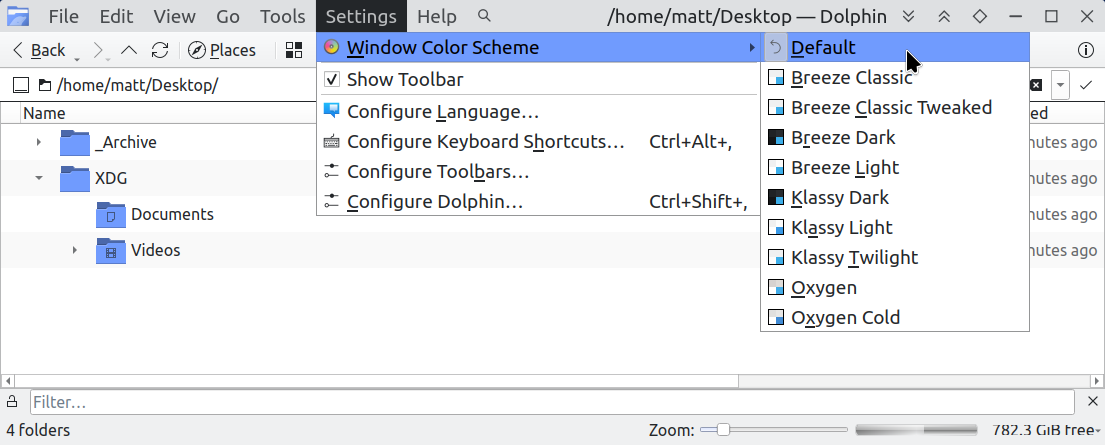
We might have run into the same bug. For some reason, the Dolphin-specific Color Theme needed to be reset:
Offline
#4 2026-01-02 06:23:08
- lyriclaw
- Member
- Registered: 2024-03-11
- Posts: 4
Re: Dolphin - Color scheme loads incorrectly on launch
Get into the same issue.
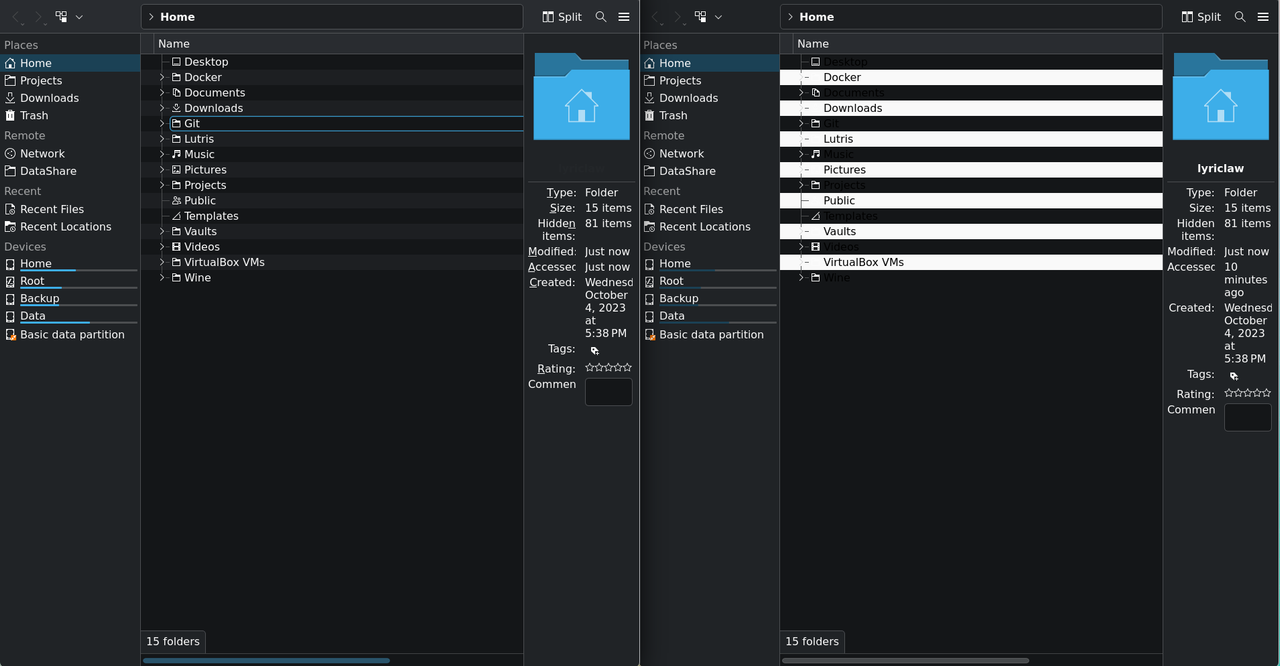
Some colors keep as default scheme on startup. Changing the color scheme on settings only works in the current window. Even openning a new window through the correct one makes will not work.
Offline
#5 2026-01-09 21:48:01
- out1312
- Member
- Registered: 2025-02-13
- Posts: 9
Re: Dolphin - Color scheme loads incorrectly on launch
In case anyone seems to have the same issue, changing the Colour scheme to Style's colors instead of Default on qt6ct after exporting QT_QPA_PLATFORMTHEME=qt6ct in .bash_profile fixed it for me in 3 different systems.
Offline
#6 2026-01-11 08:35:33
- lyriclaw
- Member
- Registered: 2024-03-11
- Posts: 4
Re: Dolphin - Color scheme loads incorrectly on launch
Recently I fixed the issue by installing aur/qt6ct-kde instead of the origin qt6ct package. Hope it may help someone.
By the way, this issue only appears on Niri sessions but not on KDE in my case .
Last edited by lyriclaw (2026-01-11 08:36:16)
Offline
#7 Yesterday 18:59:01
- Ooops
- Member
- Registered: 2020-06-16
- Posts: 5
Re: Dolphin - Color scheme loads incorrectly on launch
Same problem here with i3wm.
Selecting the default color scheme correctly uses the qt6ct configuration, but on every start Dolphin falls back to Breeze instead again.
When using a newer qt6ct version than the default 0.11-3 in the repos right now it at least remembers to start dark... but it's still Breeze Dark instead of the correct default settings.
Edit: After further testing...
Somehow selecting Default in Dolphin makes it just remove the "ColorScheme=" line in dolphinrc. Then at the next start is doesn't know what to do, falls back to Breeze and adds "ColorScheme=Breeze".
So manually adding
[UiSettings]
ColorScheme=default
to dolphinrc fixed it... somewhat, at least for the time. As long as I don't try to change it in Dolphin's popup menu...
Last edited by Ooops (Yesterday 19:20:38)
Offline